
2013年10月28日 星期一

2012年3月1日 星期四
Windows 7 + Git + ssh
之前團隊需要一個SCM來管理程式,簡單study了一下,最後決定用Git來管理團隊的程式(其實也沒有study多少,主要原因還是因為Git功能強大,而且好像很好玩 XD)
公司裡面沒有Linux base的Server,倒是新買了一台Window7的主機,又不想灌VM,因此就直接在Windows7上面架Git Server囉。
簡單的拜了一下Google大神,目前大家普遍使用的環境是msysgit + Copssh,其中msysgit是提供Windows環境下的Git Repository,由於是要架Server給其他Client來使用,因此需要搭配一個protocol來作傳輸,Copssh就是擔任這個角色。由於ssh會先將資料壓縮後加密,就傳輸上來說比較有效率。
msysgit以及Copssh目前在網路上都可以下載,只是Copssh現在已經不是免費的了(有心的話還是可以找到的)
另外由於團隊大部份人使用eclipse來開發,因此最後也要做到能夠直接從EGit(eclipse上的git plugin)來存取git Server
先簡單將重點outline在下面:
接下來就一步一步來進行
如果要讓其他人可以透過ssh來存取Server端的git repo

"Forward"

選擇要加入Copssh的使用者,下拉式選單讓你可以從目前Windows使用者來選取

設定這個使用者的一些屬性

完成


"Forward"

選擇加密的類型以及長度,按下"Forward"

如同之前所講的,這裡產生的private key是要給eclipse的EGit用的,如果設定Passphrase會出現不明的問題,因此在這裡將Empty passphrase勾選起來,不設定其值

完成

在Copssh該使用者的目錄下會看到剛產生的private key

接下來要在eclipse裡面利用ssh連結git repo
Window -> Preferences -> General -> Network Connections -> SSH2,在General tab裡面按下"Add Private Key"按鈕,選擇從Server拿到的private key

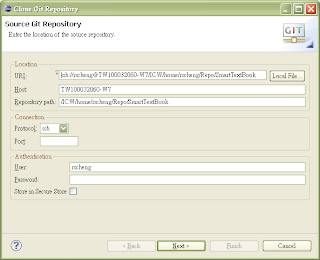
在eclipse裡面切換到GIT Perspective,在GIT Repositor的Tab裡面按下"Clone a Git Repo.."按鈕
輸入Server端的URI資訊
選擇要匯入的branch

選擇本端(client)的資料夾,按下"Finish"完成

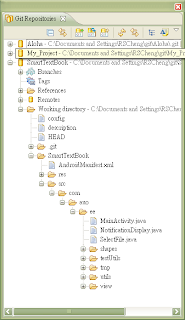
所有程序到此完成結束
由於我們ssh使用的是RSA加密演算法,所以這裡簡單介紹一下概念:
RSA有兩種用法
加密:
公鑰和私鑰是成對出現的。公鑰用來加密,私鑰用來解密。公鑰加密的訊息只有同對的私鑰可以解密。公鑰可以傳給其他人,私鑰只可以自己擁有。當其他人拿到用公鑰加密過的訊息,由於沒有私鑰,所以無法讀取訊息內容。
簽章:
公鑰和私鑰是成對出現的。公鑰用來解密,私鑰用來加密。如果公鑰解出來的訊息是正確的,帶表這訊息是由私鑰擁有者所傳送出來,藉此達成所謂簽章的效果。
reference :
Step by Step Setup Git Server on Windows with CopSSH + msysGit and Integrate Git with Visual Studio
Public-key cryptography
鳥哥
公司裡面沒有Linux base的Server,倒是新買了一台Window7的主機,又不想灌VM,因此就直接在Windows7上面架Git Server囉。
簡單的拜了一下Google大神,目前大家普遍使用的環境是msysgit + Copssh,其中msysgit是提供Windows環境下的Git Repository,由於是要架Server給其他Client來使用,因此需要搭配一個protocol來作傳輸,Copssh就是擔任這個角色。由於ssh會先將資料壓縮後加密,就傳輸上來說比較有效率。
msysgit以及Copssh目前在網路上都可以下載,只是Copssh現在已經不是免費的了(
另外由於團隊大部份人使用eclipse來開發,因此最後也要做到能夠直接從EGit(eclipse上的git plugin)來存取git Server
先簡單將重點outline在下面:
- msysgit提供Windows上的git repository
- Copssh提供Windows上的ssh連線
- Copssh的使用者必須從Windows上面的使用者來加入
- Copssh提供產生金鑰的功能,每個使用者都可以產生各自的私鑰
- 因為不明原因,eclipse裡面用的private key如果有加上passphrase會出現問題,所以我用Copssh在產生私鑰的時候,就不設定passphrase
接下來就一步一步來進行
如果要讓其他人可以透過ssh來存取Server端的git repo
- 在Server端Windows系統必須替每個使用者新增帳號
- 在Copssh中,將Windows帳號加入,並且為每個帳號產生一個private key
- 將private key交給該使用者

"Forward"

選擇要加入Copssh的使用者,下拉式選單讓你可以從目前Windows使用者來選取

設定這個使用者的一些屬性

完成

接下來要替剛加入的帳號產生一個private key

"Forward"

選擇加密的類型以及長度,按下"Forward"

如同之前所講的,這裡產生的private key是要給eclipse的EGit用的,如果設定Passphrase會出現不明的問題,因此在這裡將Empty passphrase勾選起來,不設定其值

完成

在Copssh該使用者的目錄下會看到剛產生的private key

接下來要在eclipse裡面利用ssh連結git repo
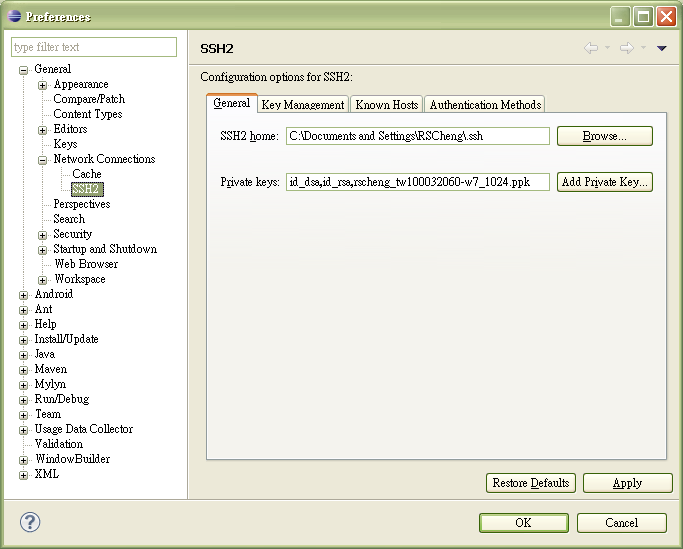
Window -> Preferences -> General -> Network Connections -> SSH2,在General tab裡面按下"Add Private Key"按鈕,選擇從Server拿到的private key
在eclipse裡面切換到GIT Perspective,在GIT Repositor的Tab裡面按下"Clone a Git Repo.."按鈕
輸入Server端的URI資訊

選擇要匯入的branch

選擇本端(client)的資料夾,按下"Finish"完成

在Git Repostories 可以看到剛才加入的Repostory

所有程序到此完成結束
由於我們ssh使用的是RSA加密演算法,所以這裡簡單介紹一下概念:
RSA有兩種用法
- 加密:公鑰用來加密,私鑰用來解密
- 簽章:私鑰加密,公鑰解密,也說是憑證
加密:
公鑰和私鑰是成對出現的。公鑰用來加密,私鑰用來解密。公鑰加密的訊息只有同對的私鑰可以解密。公鑰可以傳給其他人,私鑰只可以自己擁有。當其他人拿到用公鑰加密過的訊息,由於沒有私鑰,所以無法讀取訊息內容。
簽章:
公鑰和私鑰是成對出現的。公鑰用來解密,私鑰用來加密。如果公鑰解出來的訊息是正確的,帶表這訊息是由私鑰擁有者所傳送出來,藉此達成所謂簽章的效果。
reference :
Step by Step Setup Git Server on Windows with CopSSH + msysGit and Integrate Git with Visual Studio
Public-key cryptography
鳥哥
2012年2月3日 星期五
在Eclipse中加入android framework的source
以下皆以gingerbread平台(level 10)為例子,其他平台做法相同
- 將Android source code下載回來,參考 http://source.android.com/source/downloading.html
- 在Android sdk的目錄下/platforms/android-10/目錄下,新增一個sources子目錄
- 到下載回來的Android source code裡面,找到
/gingerbread/frameworks/base/core/java/android/ .
/gingerbread/frameworks/base/core/java/com/ .
/gingerbread/dalvik/libcore/dalvik/src/main/java/dalvik/ .
/gingerbread/dalvik/libcore/luni-kernel/src/main/java/java/ .
/gingerbread/dalvik/libcore/luni-kernel/src/main/java/org/ .
- 將上面資料複製到sources目錄下
- 完成
2012年1月31日 星期二
Android中Broadcast的action整理
Android平台上,當系統發生某種狀態的改變時(如收到一封簡訊),會發出Broadcast通知,如果其他程式想要在某些狀態發生時做特定處理,就必須註冊接收這些狀態。
底下列出目前所有Android會發出的Broadcast action
Api Level 3:(SDK 1.5)
Api Level 4 (SDK 1.6) 新增
Api Level 5 (SDK 2.0) 修改
Api Level 5 (SDK 2.0) 新增
Api Level 7(SDK 2.1) 新增
Api Level 8(SDK 2.2) 新增
底下列出目前所有Android會發出的Broadcast action
Api Level 3:(SDK 1.5)
- android.bluetooth.a2dp.intent.action.SINK_STATE_CHANGED
- android.bluetooth.intent.action.BLUETOOTH_STATE_CHANGED
- android.bluetooth.intent.action.BOND_STATE_CHANGED_ACTION
- android.bluetooth.intent.action.DISCOVERY_COMPLETED
- android.bluetooth.intent.action.DISCOVERY_STARTED
- android.bluetooth.intent.action.HEADSET_ADUIO_STATE_CHANGED
- android.bluetooth.intent.action.HEADSET_STATE_CHANGED
- android.bluetooth.intent.action.NAME_CHANGED
- android.bluetooth.intent.action.PAIRING_CANCEL
- android.bluetooth.intent.action.PAIRING_REQUEST
- android.bluetooth.intent.action.REMOTE_DEVICE_CONNECTED
- android.bluetooth.intent.action.REMOTE_DEVICE_DISAPPEARED
- android.bluetooth.intent.action.REMOTE_DEVICE_DISAPPEARED
- android.bluetooth.intent.action.REMOTE_DEVICE_DISCONNECTED
- android.bluetooth.intent.action.REMOTE_DEVICE_DISCONNECT_REQUESTED
- android.bluetooth.intent.action.REMOTE_DEVICE_FOUND
- android.bluetooth.intent.action.REMOTE_NAME_FAILED
- android.bluetooth.intent.action.REMOTE_NAME_UPDATED
- android.bluetooth.intent.action.SCAN_MODE_CHANGED
- android.intent.action.AIRPLANE_MODE
- android.intent.action.BATTERY_CHANGED
- android.intent.action.BATTERY_LOW
- android.intent.action.BOOT_COMPLETED
- android.intent.action.CAMERA_BUTTON
- android.intent.action.CONFIGURATION_CHANGED
- android.intent.action.DATA_SMS_RECEIVED
- android.intent.action.DATE_CHANGED
- android.intent.action.DEVICE_STORAGE_LOW
- android.intent.action.DEVICE_STORAGE_OK
- android.intent.action.GTALK_CONNECTED
- android.intent.action.GTALK_DISCONNECTED
- android.intent.action.HEADSET_PLUG
- android.intent.action.INPUT_METHOD_CHANGED
- android.intent.action.MANAGE_PACKAGE_STORAGE
- android.intent.action.MEDIA_BAD_REMOVAL
- android.intent.action.MEDIA_BUTTON
- android.intent.action.MEDIA_CHECKING
- android.intent.action.MEDIA_EJECT
- android.intent.action.MEDIA_MOUNTED
- android.intent.action.MEDIA_NOFS
- android.intent.action.MEDIA_REMOVED
- android.intent.action.MEDIA_SCANNER_FINISHED
- android.intent.action.MEDIA_SCANNER_SCAN_FILE
- android.intent.action.MEDIA_SCANNER_STARTED
- android.intent.action.MEDIA_SHARED
- android.intent.action.MEDIA_UNMOUNTABLE
- android.intent.action.MEDIA_UNMOUNTED
- android.intent.action.NEW_OUTGOING_CALL
- android.intent.action.PACKAGE_ADDED
- android.intent.action.PACKAGE_CHANGED
- android.intent.action.PACKAGE_DATA_CLEARED
- android.intent.action.PACKAGE_INSTALL
- android.intent.action.PACKAGE_REMOVED
- android.intent.action.PACKAGE_REPLACED
- android.intent.action.PACKAGE_RESTARTED
- android.intent.action.PHONE_STATE
- android.intent.action.PROVIDER_CHANGED
- android.intent.action.REBOOT
- android.intent.action.SCREEN_OFF
- android.intent.action.SCREEN_ON
- android.intent.action.TIMEZONE_CHANGED
- android.intent.action.TIME_SET
- android.intent.action.TIME_TICK
- android.intent.action.UID_REMOVED
- android.intent.action.UMS_CONNECTED
- android.intent.action.UMS_DISCONNECTED
- android.intent.action.USER_PRESENT
- android.intent.action.WALLPAPER_CHANGED
- android.media.AUDIO_BECOMING_NOISY
- android.media.RINGER_MODE_CHANGED
- android.media.VIBRATE_SETTING_CHANGED
- android.net.conn.BACKGROUND_DATA_SETTING_CHANGED
- android.net.wifi.NETWORK_IDS_CHANGED
- android.net.wifi.RSSI_CHANGED
- android.net.wifi.SCAN_RESULTS
- android.net.wifi.STATE_CHANGE
- android.net.wifi.WIFI_STATE_CHANGED
- android.net.wifi.supplicant.CONNECTION_CHANGE
- android.net.wifi.supplicant.STATE_CHANGE
- android.provider.Telephony.SIM_FULL
- android.provider.Telephony.SMS_RECEIVED
- android.provider.Telephony.WAP_PUSH_RECEIVED
- com.google.gservices.intent.action.GSERVICES_CHANGED
- android.bluetooth.a2dp.intent.action.SINK_STATE_CHANGED
- android.bluetooth.intent.action.BLUETOOTH_STATE_CHANGED
- android.bluetooth.intent.action.BOND_STATE_CHANGED_ACTION
- android.bluetooth.intent.action.DISCOVERY_COMPLETED
- android.bluetooth.intent.action.DISCOVERY_STARTED
- android.bluetooth.intent.action.HEADSET_ADUIO_STATE_CHANGED
- android.bluetooth.intent.action.HEADSET_STATE_CHANGED
- android.bluetooth.intent.action.NAME_CHANGED
- android.bluetooth.intent.action.PAIRING_CANCEL
- android.bluetooth.intent.action.PAIRING_REQUEST
- android.bluetooth.intent.action.REMOTE_DEVICE_CONNECTED
- android.bluetooth.intent.action.REMOTE_DEVICE_DISAPPEARED
- android.bluetooth.intent.action.REMOTE_DEVICE_DISAPPEARED
- android.bluetooth.intent.action.REMOTE_DEVICE_DISCONNECTED
- android.bluetooth.intent.action.REMOTE_DEVICE_DISCONNECT_REQUESTED
- android.bluetooth.intent.action.REMOTE_DEVICE_FOUND
- android.bluetooth.intent.action.REMOTE_NAME_FAILED
- android.bluetooth.intent.action.REMOTE_NAME_UPDATED
- android.bluetooth.intent.action.SCAN_MODE_CHANGED
- android.intent.action.AIRPLANE_MODE
- android.intent.action.BATTERY_CHANGED
- android.intent.action.BATTERY_LOW
- android.intent.action.BOOT_COMPLETED
- android.intent.action.CAMERA_BUTTON
- android.intent.action.CONFIGURATION_CHANGED
- android.intent.action.DATA_SMS_RECEIVED
- android.intent.action.DATE_CHANGED
- android.intent.action.DEVICE_STORAGE_LOW
- android.intent.action.DEVICE_STORAGE_OK
- android.intent.action.GTALK_CONNECTED
- android.intent.action.GTALK_DISCONNECTED
- android.intent.action.HEADSET_PLUG
- android.intent.action.INPUT_METHOD_CHANGED
- android.intent.action.MANAGE_PACKAGE_STORAGE
- android.intent.action.MEDIA_BAD_REMOVAL
- android.intent.action.MEDIA_BUTTON
- android.intent.action.MEDIA_CHECKING
- android.intent.action.MEDIA_EJECT
- android.intent.action.MEDIA_MOUNTED
- android.intent.action.MEDIA_NOFS
- android.intent.action.MEDIA_REMOVED
- android.intent.action.MEDIA_SCANNER_FINISHED
- android.intent.action.MEDIA_SCANNER_SCAN_FILE
- android.intent.action.MEDIA_SCANNER_STARTED
- android.intent.action.MEDIA_SHARED
- android.intent.action.MEDIA_UNMOUNTABLE
- android.intent.action.MEDIA_UNMOUNTED
- android.intent.action.NEW_OUTGOING_CALL
- android.intent.action.PACKAGE_ADDED
- android.intent.action.PACKAGE_CHANGED
- android.intent.action.PACKAGE_DATA_CLEARED
- android.intent.action.PACKAGE_INSTALL
- android.intent.action.PACKAGE_REMOVED
- android.intent.action.PACKAGE_REPLACED
- android.intent.action.PACKAGE_RESTARTED
- android.intent.action.PHONE_STATE
- android.intent.action.PROVIDER_CHANGED
- android.intent.action.REBOOT
- android.intent.action.SCREEN_OFF
- android.intent.action.SCREEN_ON
- android.intent.action.TIMEZONE_CHANGED
- android.intent.action.TIME_SET
- android.intent.action.TIME_TICK
- android.intent.action.UID_REMOVED
- android.intent.action.UMS_CONNECTED
- android.intent.action.UMS_DISCONNECTED
- android.intent.action.USER_PRESENT
- android.intent.action.WALLPAPER_CHANGED
- android.media.AUDIO_BECOMING_NOISY
- android.media.RINGER_MODE_CHANGED
- android.media.VIBRATE_SETTING_CHANGED
- android.net.conn.BACKGROUND_DATA_SETTING_CHANGED
- android.net.wifi.NETWORK_IDS_CHANGED
- android.net.wifi.RSSI_CHANGED
- android.net.wifi.SCAN_RESULTS
- android.net.wifi.STATE_CHANGE
- android.net.wifi.WIFI_STATE_CHANGED
- android.net.wifi.supplicant.CONNECTION_CHANGE
- android.net.wifi.supplicant.STATE_CHANGE
- android.provider.Telephony.SIM_FULL
- android.provider.Telephony.SMS_RECEIVED
- android.provider.Telephony.WAP_PUSH_RECEIVED
- com.google.gservices.intent.action.GSERVICES_CHANGED
Api Level 4 (SDK 1.6) 新增
- android.intent.action.ACTION_POWER_CONNECTED
- android.intent.action.ACTION_POWER_DISCONNECTED
- android.intent.action.ACTION_SHUTDOWN
- android.intent.action.BATTERY_OKAY
- android.speech.tts.TTS_QUEUE_PROCESSING_COMPLETED
- android.speech.tts.engine.TTS_DATA_INSTALLED
- com.google.gservices.intent.action.GSERVICES_OVERRIDE
- android.intent.action.ACTION_POWER_CONNECTED
- android.intent.action.ACTION_POWER_DISCONNECTED
- android.intent.action.ACTION_SHUTDOWN
- android.intent.action.BATTERY_OKAY
- android.speech.tts.TTS_QUEUE_PROCESSING_COMPLETED
- android.speech.tts.engine.TTS_DATA_INSTALLED
- com.google.gservices.intent.action.GSERVICES_OVERRIDE
Api Level 5 (SDK 2.0) 修改
- android.bluetooth.a2dp.action.SINK_STATE_CHANGED
- android.bluetooth.adapter.action.DISCOVERY_FINISHED
- android.bluetooth.adapter.action.DISCOVERY_STARTED
- android.bluetooth.adapter.action.LOCAL_NAME_CHANGED
- android.bluetooth.adapter.action.SCAN_MODE_CHANGED
- android.bluetooth.adapter.action.STATE_CHANGED
- android.bluetooth.device.action.ACL_CONNECTED
- android.bluetooth.device.action.ACL_DISCONNECTED
- android.bluetooth.device.action.ACL_DISCONNECT_REQUESTED
- android.bluetooth.device.action.BOND_STATE_CHANGED
- android.bluetooth.device.action.CLASS_CHANGED
- android.bluetooth.device.action.FOUND
- android.bluetooth.device.action.NAME_CHANGED
- android.bluetooth.devicepicker.action.DEVICE_SELECTED
- android.bluetooth.devicepicker.action.LAUNCH
- android.bluetooth.headset.action.AUDIO_STATE_CHANGED
- android.bluetooth.headset.action.STATE_CHANGED
- android.bluetooth.a2dp.action.SINK_STATE_CHANGED
- android.bluetooth.adapter.action.DISCOVERY_FINISHED
- android.bluetooth.adapter.action.DISCOVERY_STARTED
- android.bluetooth.adapter.action.LOCAL_NAME_CHANGED
- android.bluetooth.adapter.action.SCAN_MODE_CHANGED
- android.bluetooth.adapter.action.STATE_CHANGED
- android.bluetooth.device.action.ACL_CONNECTED
- android.bluetooth.device.action.ACL_DISCONNECTED
- android.bluetooth.device.action.ACL_DISCONNECT_REQUESTED
- android.bluetooth.device.action.BOND_STATE_CHANGED
- android.bluetooth.device.action.CLASS_CHANGED
- android.bluetooth.device.action.FOUND
- android.bluetooth.device.action.NAME_CHANGED
- android.bluetooth.devicepicker.action.DEVICE_SELECTED
- android.bluetooth.devicepicker.action.LAUNCH
- android.bluetooth.headset.action.AUDIO_STATE_CHANGED
- android.bluetooth.headset.action.STATE_CHANGED
Api Level 5 (SDK 2.0) 新增
- android.intent.action.DOCK_EVENT
- android.provider.Telephony.SMS_REJECTED
- android.intent.action.DOCK_EVENT
- android.provider.Telephony.SMS_REJECTED
Api Level 7(SDK 2.1) 新增
- android.intent.action.LOCALE_CHANGED
- android.intent.action.LOCALE_CHANGED
Api Level 8(SDK 2.2) 新增
- android.app.action.ACTION_PASSWORD_CHANGED
- android.app.action.ACTION_PASSWORD_FAILED
- android.app.action.ACTION_PASSWORD_SUCCEEDED
- android.app.action.DEVICE_ADMIN_DISABLED
- android.app.action.DEVICE_ADMIN_DISABLE_REQUESTED
- android.app.action.DEVICE_ADMIN_ENABLED
- android.intent.action.EXTERNAL_APPLICATIONS_AVAILABLE
- android.intent.action.EXTERNAL_APPLICATIONS_UNAVAILABLE
- android.media.SCO_AUDIO_STATE_CHANGED
2010年2月4日 星期四
Big endian, Little endian
big endian 與 little endian 指的是位元組在記憶體裡面的排列順序(詳細定義更複雜,這裡為方便起見以此為例)
- big endian:較高的位元組在位址的較後位置,舉例來說
long a = 0x12345678,這樣子的資料在記憶體裡面的排列順序為 0x12 0x34 0x56 0x78
參考wiki的圖如下
- little endian:較高的位元組在位址的較前位置,繼續前面的例子
long a = 0x12345678,這樣子的資料在記憶體裡面的排列順序為 0x78 0x56 0x34 0x12
參考wiki的圖如下


2010年2月3日 星期三
程式設計上的兩種Stub
- 不包含任何邏輯,純粹只是一個空的function,這種function叫做stub function
public void int sum(int a, int b) {
//do not calculate but return a constant number
return 0;
}
- 在分散式系統中,處理的function在remote端,而在local端設計一個function,接收local端的參數,然後再送交remote端處理。
public void int sum(int a, int b) {
//call remote function
mWebRMI.sum(a, b);
}
A stub in distributed computing is a piece of code used for converting parameters passed during a Remote Procedure Call (RPC).
2010年1月28日 星期四
Handler, Message, MessageQueue, Looper and Thread
- Handler是用來處理Message,在Message裡面的what欄位可以說明Message的種類,當Message送到Handler後,Handler會看這個Message的what欄位,再用相對應的邏輯處理。
- MessageQueue是一個FIFO的資料結構,可以把Message暫放在裡面等待被處理。
- Looper是一個用來將MessageQueue裡面的Message逐一送到Handler的類別。
- 由於Looper會佔住Main Thread的執行,所以通常會產生一個外部的Thread來幫忙執行。每一個Thread都有自己的Looper以及MessageQueue,可以在Thread中利用getLooper()來取得looper物件,然後再用Looper.myQueue()取得該Thread的MessageQueue來使用。
訂閱:
文章 (Atom)